UCefView dynamically loads XCef. CEF runs in the separate XCefHost process. Each plugin release supports a fixed XCef API version; choose among compatible CEF variants offered by its SDK catalog.
Install and select an SDK
Open Project Settings > Engine > UCefView Settings > XCef SDK, refresh the catalog, download/install a compatible package, and choose Use for this project. Restart the Editor to load it. Installing a different package requires explicit selection. Installing or updating an already selected package saves its digest after success, provided the selection was not changed during download. If this Editor has not loaded that SDK, installation prompts for a restart even when its configuration was already present. Installing for another architecture does not require this Editor to restart. Selecting an SDK does not request a build.
Packages are checked for archive integrity, SHA-256, XCef version, and required runtime files. Already installed packages can be discovered locally without GitHub access. Different projects can select different packages or reuse the same installation.
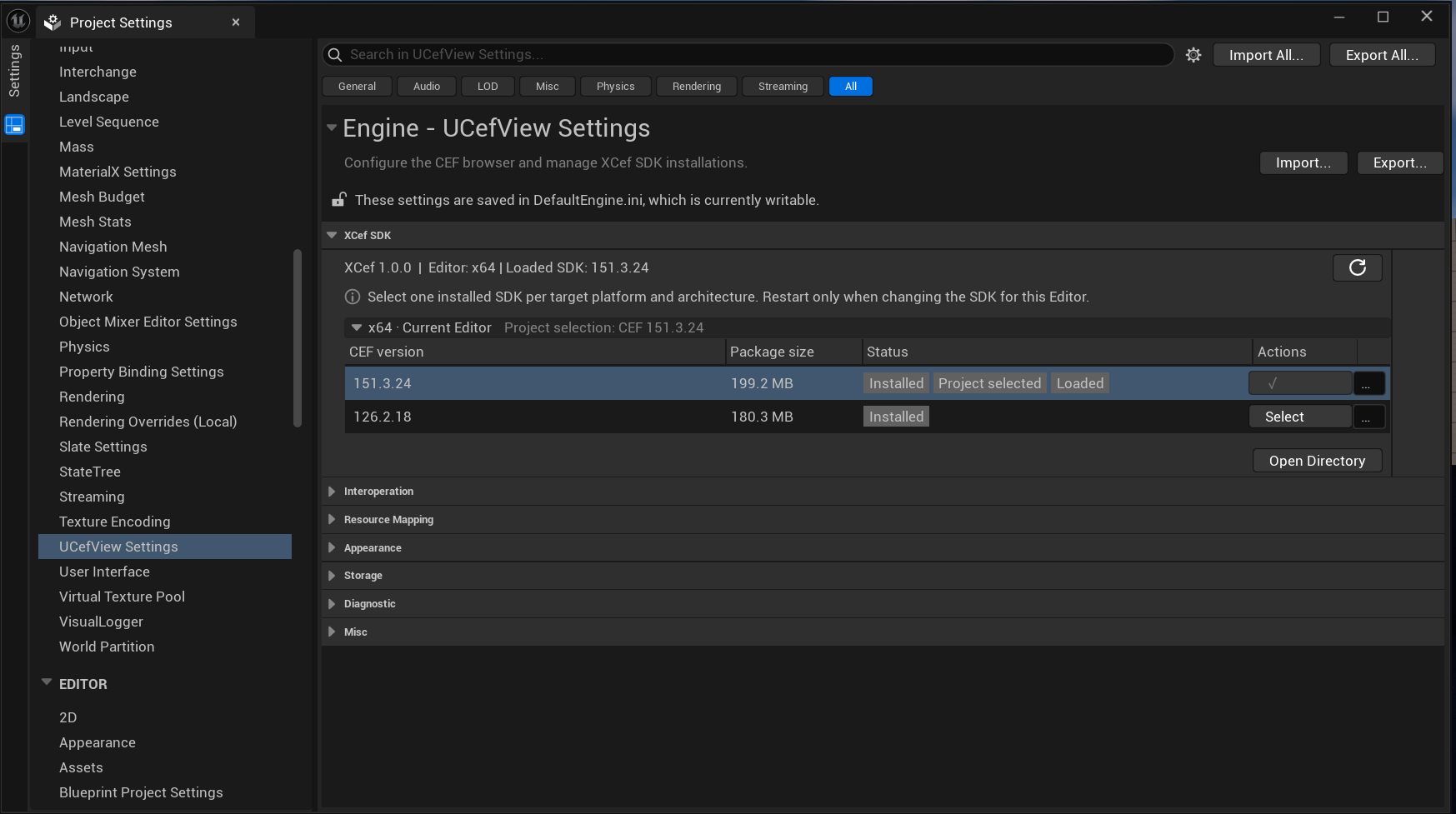
XCef SDK management in UCefView Settings
The SDK panel shows the current Editor architecture and loaded SDK at the top. Each row distinguishes Installed (available locally), Project selected (saved in project configuration), and Loaded (used by this Editor session). Use Select to choose an installed SDK and Open Directory to inspect the installation directory.
The general settings banner refers to DefaultEngine.ini; XCef SDK selection is stored separately in Config/DefaultEditor.ini.
Shared installation and project selection
| System | Default shared root |
| Windows | LOCALAPPDATA%/XCef |
| macOS | ~/Library/Application Support/XCef |
| Linux | ${XDG_DATA_HOME:-~/.local/share}/XCef |
UCEFVIEW_XCEF_SDK_ROOT overrides this root. Each complete SDK is stored at <root>/<xcef-version>/<cef-short-version>/<platform>-<architecture>/<sha256-first-16>/. For example, the Windows library is <installation>/XCef/bin/Win64/XCef.dll. The revision directory uses the first 16 lowercase SHA256 characters; receipts and configuration retain the full digest. Same-name updates install alongside the old revision. The selected package stays highlighted when a newer revision is available. Updating it saves the new SHA256 after successful installation and takes effect after restarting the Editor. Changes to the selection during download are preserved.
Project selections are stored in Config/DefaultEditor.ini. Commit this file with the project; each build machine installs the selected packages in its own shared root. Windows uses:
[UCefView.XCefSDK.Win64]
Package=xcef-1.0.0-cef-151.3.24
Sha256=<package SHA-256>
Linux uses [UCefView.XCefSDK.Linux]. Mac uses [UCefView.XCefSDK.Mac] with Package.arm64, Sha256.arm64, Package.x86_64, and Sha256.x86_64. Configure only the targets you use; universal Mac builds require both architectures. The settings panel groups the current operating system's packages by architecture and identifies the Editor's architecture. The configuration uses a compact package label and full SHA-256; installation records retain the complete archive name. Only the current configuration and directory layout are recognized, with no fallback to previous layouts. Paths shown here use slash notation; filesystem paths passed to platform APIs use native separators.
Editor and game loading
| Target | Runtime source | Build behavior |
| Editor, PIE, UnrealEditor -game | Selected shared installation | No SDK copy or cleanup, including Live Coding |
| Game | Project-local Binaries/ThirdParty/XCef/<platform[/architecture]> | Copies the selected SDK and stages loose NonUFS files |
This behavior is the same for Engine and project plugins. Game builds require an installed SDK; UnrealBuildTool never downloads it. Packaged games use their staged files and do not depend on the shared cache or Editor SDK manager.
The shared SDK may be loaded by several Editors. Close all Editors using it before removing or modifying it. Close running games before updating their project-local runtime files.
Initial setup and recovery
With no valid selection, or when the selected SDK is missing locally, the Editor opens and shows Set Up XCef SDK for UCefView. The reason appears first, followed by instructions to open Project Settings, install or select the SDK, and restart. Choose OK to dismiss the guidance. The dialog does not download automatically and is not shown in commandlets or unattended runs. UCefView needs a valid SDK and an Editor restart before it can display web content. Normal game builds fail when the target SDK selection or installation is missing; an old staged runtime is not a substitute.
Recovery and upgrades
- Missing or mismatched SDK in Editor: install/select a compatible SDK in UCefView Settings, reinstall a damaged package if necessary, then restart. Recompiling the project does not repair a shared installation.
- Missing SDK during game build: install the configured target package on the build machine, then build/package again. Distribute the full packaged output.
- Older Editor copies: <Project>/Binaries/ThirdParty/Editor/XCef is no longer used or automatically cleaned. It can be removed after closing processes that might still use the old plugin.
- Older forced startup builds: the plugin restores the saved preference from the previous workflow. New SDK selections only request a restart.
The .package and .sdk-receipt.json records identify the SDK payload and full archive digest. Game preparation clears the target runtime directory when either record is missing or does not match; matching package names and full digests preserve the directory. The record comparison is not a full file-content comparison.
Updating the plugin's XCef API version
Headers
Keep one cross-platform copy of the XCef public headers in Source/ThirdParty/XCef/include. UCefView includes these headers privately during compilation. Preserve the accompanying LICENSE. There is no XCef external module, import library, or bundled runtime in this source directory.
Runtime SDKs
Publish complete SDK archives for the supported operating systems and architectures. Update the fixed XCef version and release catalog in UCefViewEditor together with the plugin headers. Use a new XCef version when changing the interface; do not replace an existing version with incompatible binaries. Editor validates the XCef version, archive integrity, and required runtime files. It does not read the plugin headers.
Verification
After updating XCef, build and launch a project using UCefView, verify XCefHost startup and browser rendering, then verify packaged-game staging and startup on each supported platform.